CrystalDiskInfo displays the temperature reported by the drive. That reading is useful, but it must be compared with the actual device model and its manufacturer specification.
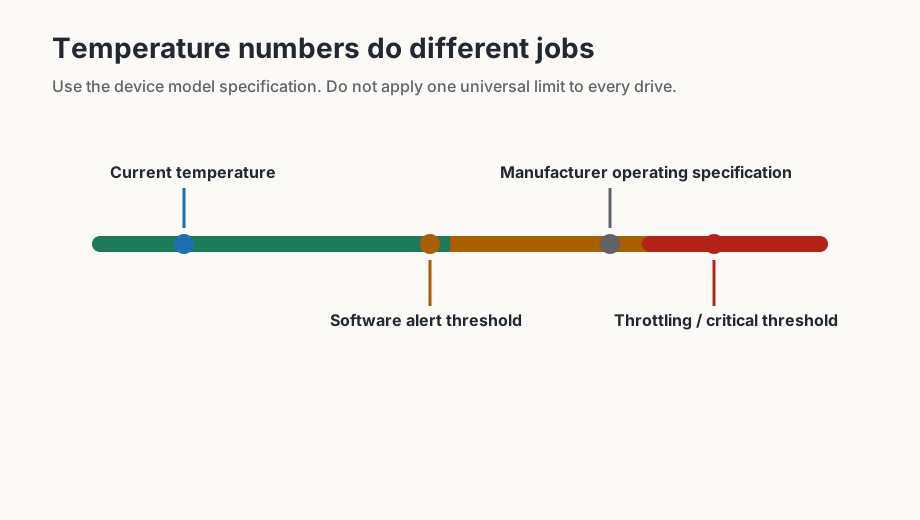
Four temperature values to separate
- Current temperature: the value CrystalDiskInfo is receiving from the drive right now.
- Software alert threshold: an alarm value chosen in CrystalDiskInfo, such as the 60 °C screenshot setting.
- Manufacturer operating range: the model-specific specification published for that drive.
- Thermal throttling or critical limit: device behavior such as reduced performance or warning states.
The configured 60 °C value in the screenshot is therefore a CrystalDiskInfo alarm threshold chosen for monitoring. It is not proof that 60 °C is a universal safe-or-unsafe boundary for every drive.
Three different temperature concepts
- Software alert threshold: a value chosen in monitoring software to notify the user.
- Manufacturer operating specification: the device model range published by the manufacturer.
- Throttling or critical temperature: device behavior where performance may be reduced or warnings may be triggered.
| Situation | General interpretation | Recommended response |
|---|---|---|
| Idle temperature higher than usual | May reflect poor airflow, enclosure heat or nearby components. | Check airflow and compare after normal use. |
| Temperature rises under load | Expected to some degree, especially for NVMe SSDs. | Check whether it approaches the model specification or causes throttling. |
| Temperature warning appears | The configured software threshold or device warning has been reached. | Reduce workload if needed, improve cooling and verify model limits. |
For ongoing alerts, see the monitoring guide.