HDD sector attributes are among the most common reasons a drive-health tool shows Caution. They describe how the drive is handling weak, remapped or uncorrectable areas of magnetic media.
| ID / Field | Attribute | Meaning | Watch |
|---|---|---|---|
| 05 | Reallocated Sectors Count | The drive has replaced problematic sectors with spare sectors. | A non-zero count is worth attention; increases over time are more concerning. |
| C5 | Current Pending Sector Count | The drive has sectors it could not read reliably and is waiting to verify. | Pending sectors can clear after a successful write or become reallocated. |
| C6 | Uncorrectable Sector Count | The drive reports sectors that could not be corrected by error correction. | A rising count is a serious signal to protect data and replace the drive when appropriate. |
No single number is a universal failure timer
A value of 1 does not guarantee imminent failure, and a large value does not tell you an exact date. The practical response depends on backup status, whether the value is increasing, the drive role and tolerance for downtime.
Why trend matters
A stable historical reallocation count on an old non-critical drive is different from a pending-sector count that rises every day. Record the values and compare after backup.
Separate pending, reallocated and uncorrectable sectors
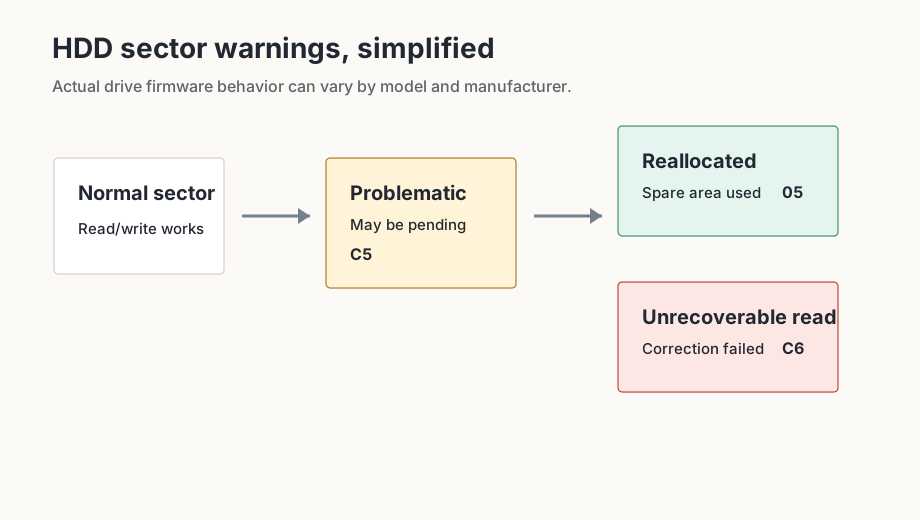
C5 describes sectors the drive could not read reliably and still needs to evaluate. A pending value may disappear after a successful write or become reallocated. 05 counts areas that have already been replaced with spare sectors. C6 points to read errors that could not be corrected.
Those terms sound like a fixed sequence, but the diagram is only a simplified model. Firmware strategies differ, and not every drive exposes every intermediate state clearly. For decisions, the more useful questions are whether important data is involved, whether the value is increasing and whether new read errors appear during ordinary use.
What a threshold cannot do
A software threshold decides when CrystalDiskInfo shows a warning. It does not repair a sector, test the surface or reset a physical condition. If you change a threshold, you change notification behavior, not the drive.
- Back up important data before long surface tests.
- Compare values again after normal use.
- Plan replacement if C5, C6 or 05 continues to increase or important data is affected.
- Do not assume a drive with sector warnings will remain stable indefinitely.
When to reduce use
If a drive reports new pending or uncorrectable values, do not use it as both the only copy of important data and the test subject. Copy important data to independent storage first. After that, diagnostics, surface scans or manufacturer tools may be useful. If the values continue increasing, replacement is often more practical than extended experimentation.
What to check after backup
After a backup, compare carefully: do C5, C6 and 05 remain unchanged, rise after normal use, or coincide with new operating-system errors? A stable value is not a guarantee, but a rising value is a stronger signal. Avoid any action that stresses the only copy of the data before it is protected.
For production drives, the question is often not whether the disk can theoretically keep running. The better question is whether the remaining risk is acceptable. A replacement drive may cost less than lost data, recovery time or an unplanned outage.